
BlissOS on Proxmox Handles Everyday Android Apps, With Gaming Limits
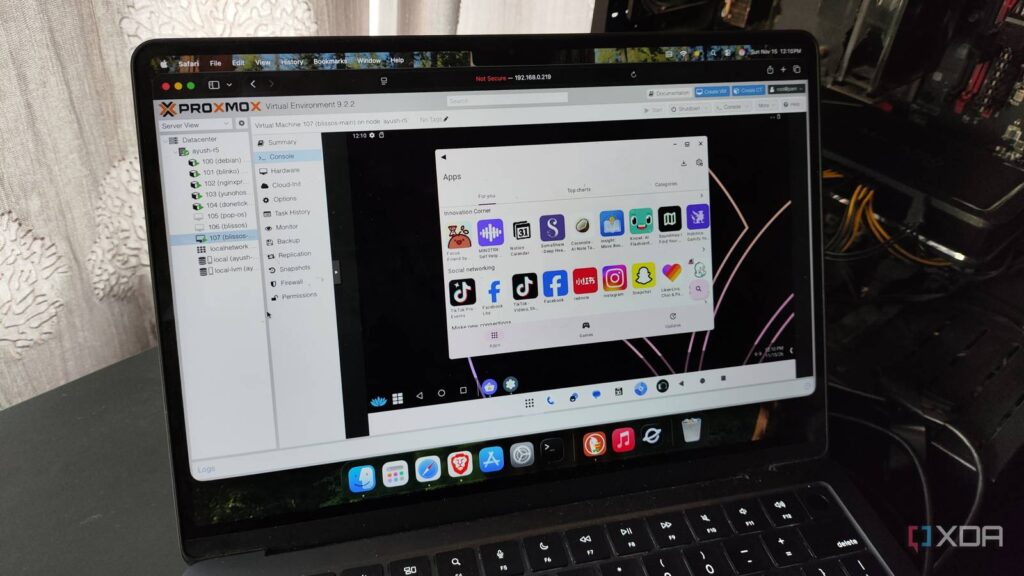
An Android virtual machine can add another app environment to a PC home lab, but an experiment reported by XDA Developers points toward productivity rather than gaming as its stronger use case. Writer Ayush Pande installed BlissOS on Proxmox and found several everyday Android apps usable, alongside display quirks and delays when switching apps.
In his report published November 16, 2026, Pande describes using an Android 13-based BlissOS release after considering other approaches. His selection reflected the versions and compatibility he encountered, rather than a comprehensive comparison of Android virtualization options.
Getting Android running required adjustments
The installation needed changes to Proxmox’s virtual hardware settings. Pande selected VirtIO-GPU graphics, the q35 machine setting and OVMF firmware, then configured partitions for EFI and the operating system.
There was another adjustment after startup: app icons initially displayed inverted colors. Pande reports correcting the appearance through Android’s color-inversion setting. He also switched from gesture navigation to three-button controls.
Useful apps, limited gaming appeal
Using the Aurora store, Pande installed Todoist, Obsidian and TickTick, which he says worked, although moving between apps without first closing the current one introduced some latency. He also reported successfully installing clients for Bitwarden, Home Assistant, Jellyfin and Immich.
Gaming was less successful. Pande described disappointing performance, but supplied no frame-rate figures or game-specific benchmarks in the report. Intel GPU passthrough was a possible future experiment, rather than a tested improvement.
For PC enthusiasts, the practical appeal is a separate Android environment for experimenting with apps alongside other virtual machines. This account offers a useful project reference, while its reported gaming limitations leave it short of demonstrating a capable Android gaming setup.